Smart Mart apps · Built by vending operators
Find your next spot.
Run your route.
Smart Mart Leads helps you find places for vending machines. Smart Mart Ops helps you manage stock, stops, sales, and your team.
Two apps. Two jobs. Use either one on its own.
For iPhone and Android. Paid features apply.
Start here
What’s on your to-do list?
Pick a job to see which app can help.
Start with Smart Mart Leads. Find places to pitch, choose which ones to visit, and keep track of each conversation.
See how Leads works →01 / Smart Mart Leads
A vending location finder
with a next step.
Find places that may be a good fit. Learn what to ask. Then keep the conversation moving.
Find places near you
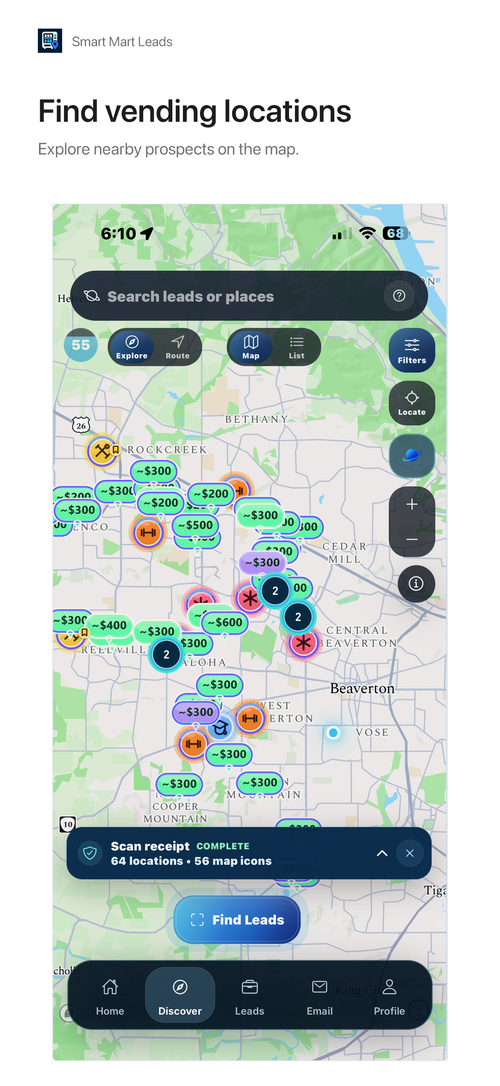
Choose a ZIP code or an area on the map. Tap Find Leads. Browse the map or list, and use filters to narrow it down.
See what makes a site a fit
Compare the type of business, likely people on site, hours, nearby food, and distance. A confidence rating shows how much information supports the result.
Get ready to reach out
Use Get Details to look for a website, phone number, or public email. Orbit, the app’s AI helper, can research a site and draft a call script, email, or short pitch.
Plan visits and follow up
Group nearby places into a route. Save contacts, log calls and visits, and mark leads Cold, Warm, or Hot. Set a follow-up date so a good conversation does not get lost.
You can track each lead from saved to contacted, meeting, proposal, and won or lost. Review email drafts in your mail app before you send them.
Take a look inside Leads
Tap a screen to open it larger. On a phone, swipe to see the next one.
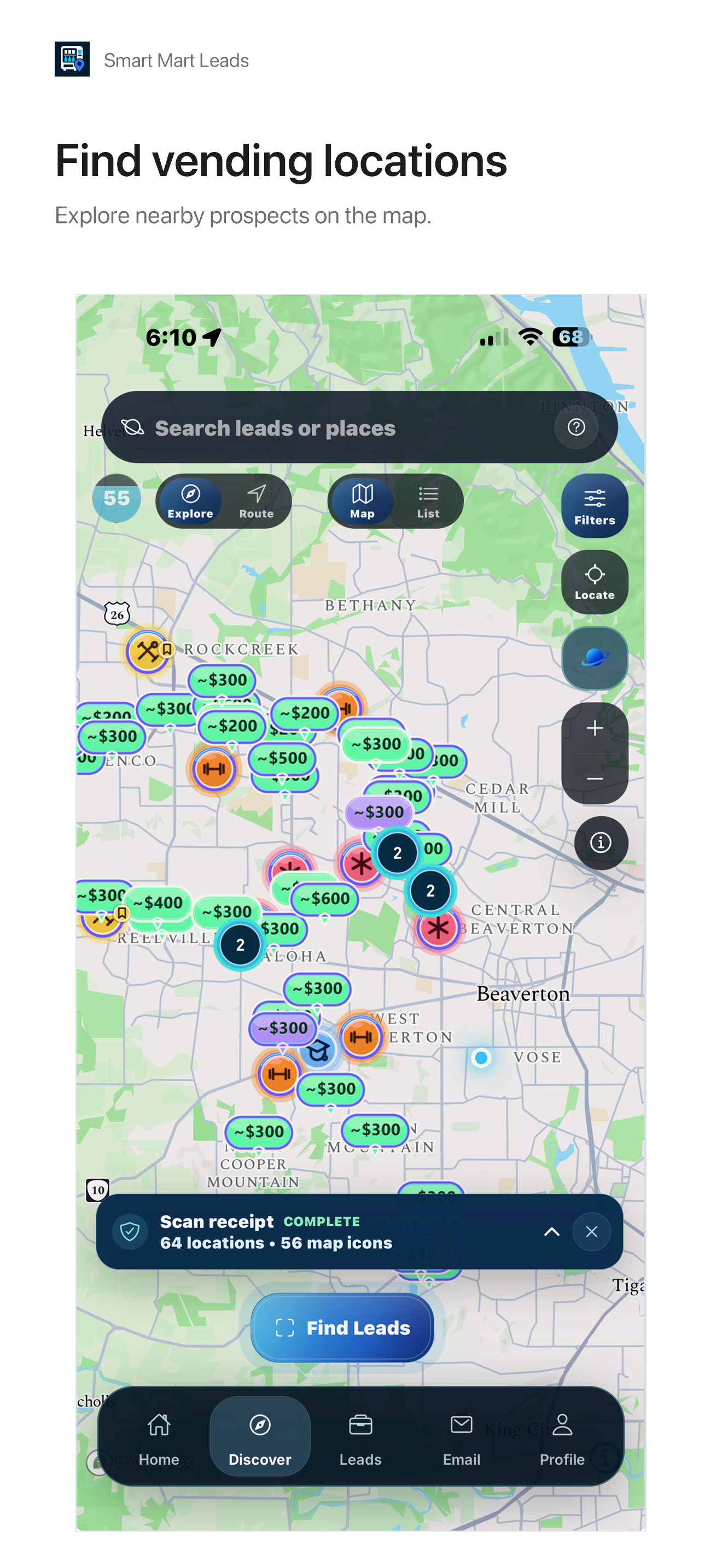
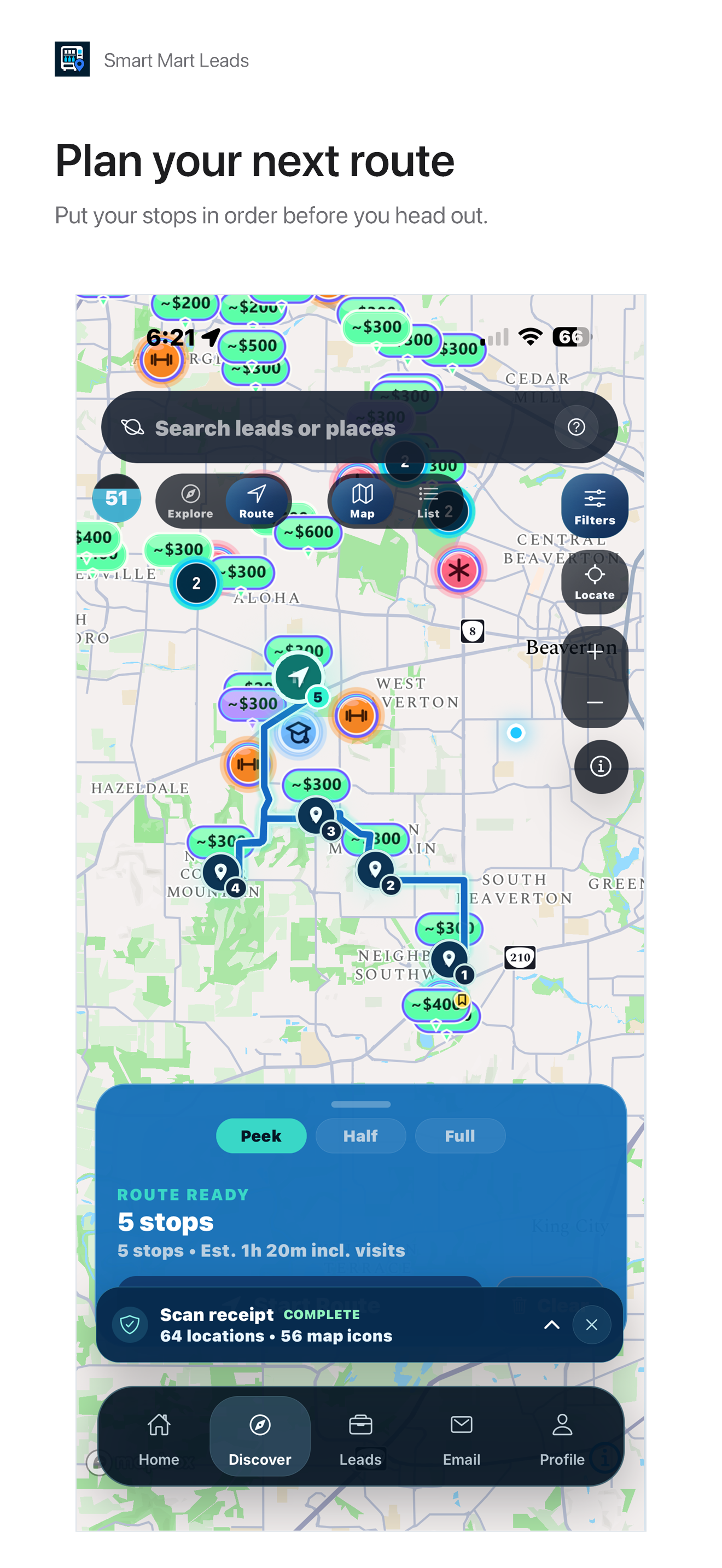
Real app screens. Details and layouts may vary by version and device.
New to finding locations? Start with this quick checklist.
02 / Smart Mart Ops
Vending route management.
From stock to sales.
Know what to pack, where to go, and what happened at each stop. Keep the rest of the business in view, too.
One workday, five connected jobs
Keep track of your stock
Scan products and add deliveries. Track stock in storage and in each machine as two separate counts. Save dates so you can spot items that may expire soon.
Make a shelf plan, called a planogram. It shows which product goes in each slot and how many items fit.
Pack for the next refill
Smart Prep uses the shelf plan, last count, and stock in storage to suggest what to bring. Recent sales help show what needs attention.
Review the list, mark items packed, and add shortages to a buy list. Use a shopping checklist by store. You still buy and receive the goods.
Plan stops and record the work
Smart Route helps weigh distance and urgent work, such as empty slots or products near their use-by date. Open maps, track mileage, and mark stops done.
At the machine, count what is there and record the refill. Pick up unfinished visits when you return.
Keep your team on the same page
Share a workspace for your business. Set tasks, shifts, and reminders. Staff can clock in and out, record breaks, and track mileage.
Review work logs to see what was done and what still needs a visit.
See sales, costs, and profit
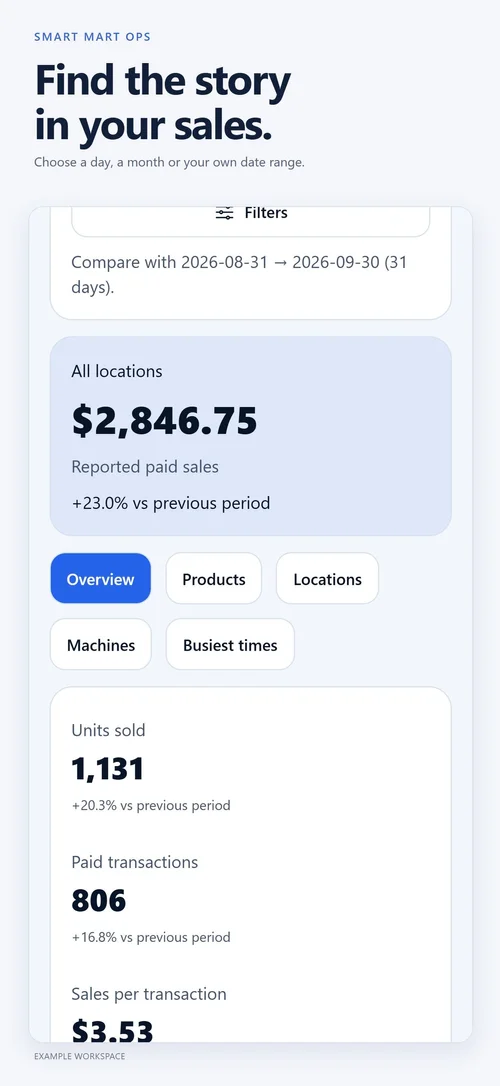
Connect a supported Nayax or HaHa account. Check sales by day, week, month, or your own date range. Compare products, machines, and locations. Export sales data or make PDF reports.
Add product costs, payment fees, site costs, and shared business bills. See each site’s profit before and after its share of common costs. Ops flags missing costs and gaps in sales data.
Take a look inside Ops
Tap a screen to explore it. These real screens use an example workspace.
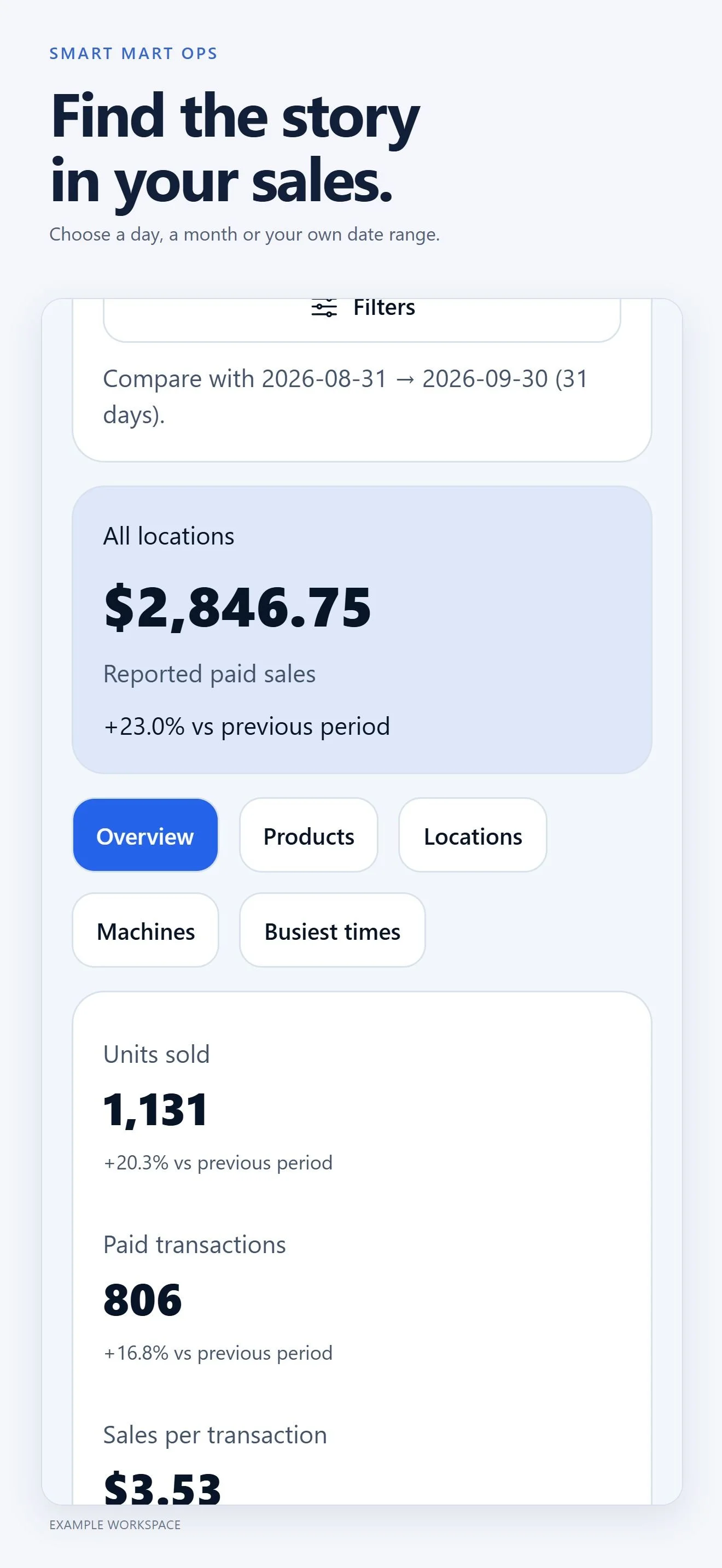
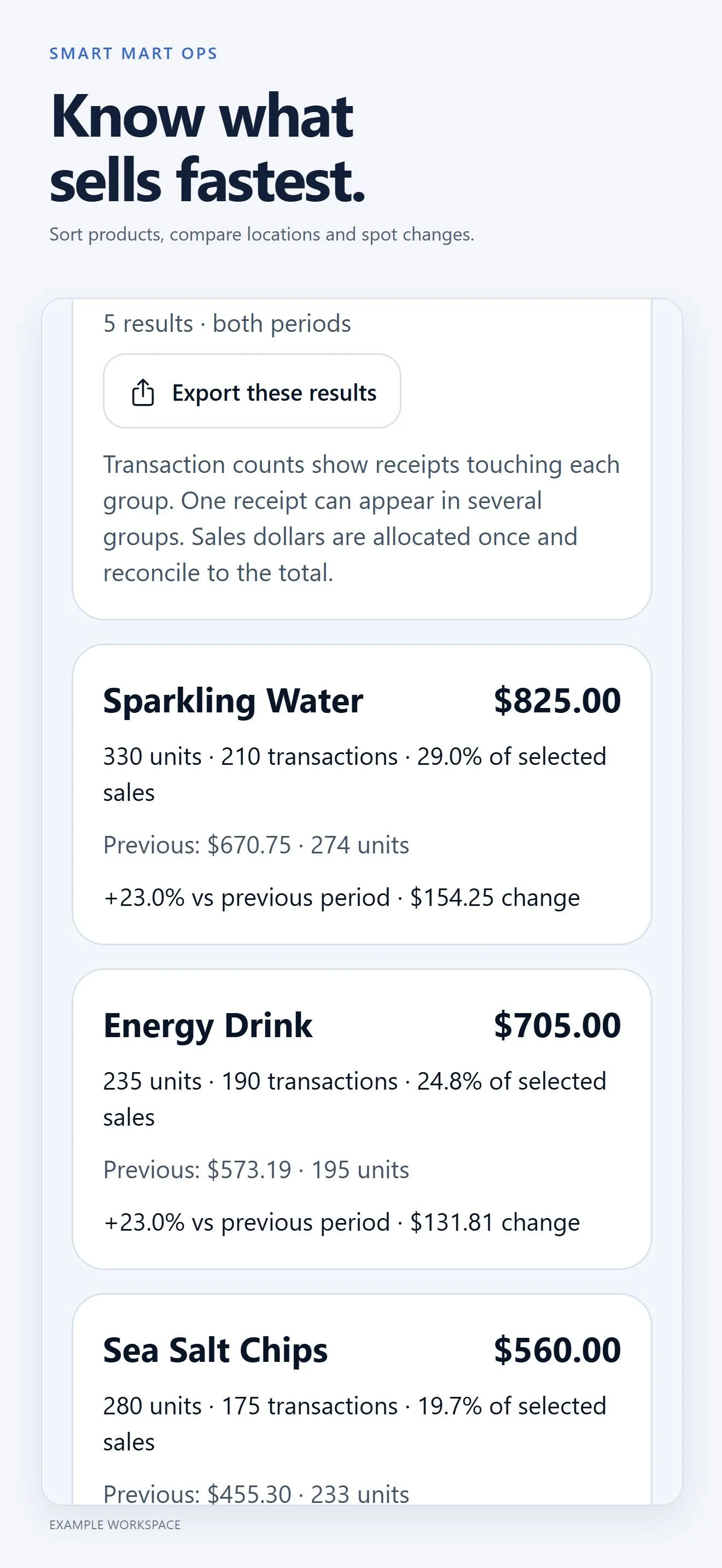
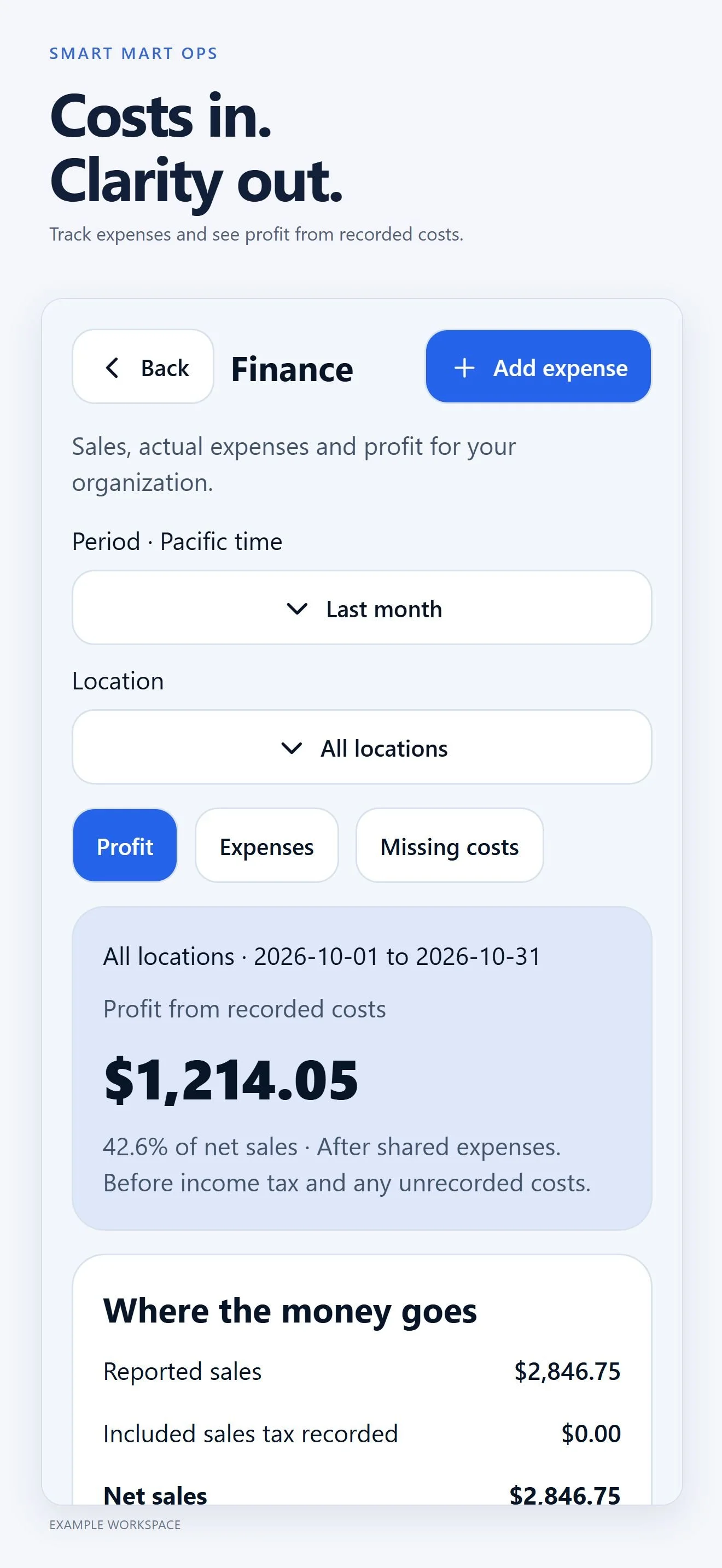
Example figures are for showing the app. They are not a claim about what your route will earn. Screens may vary by version.
Want a route example? Read our vending route guide.
Meet your in-app helper
Ask Orbit. Review the next step.
Orbit is the AI helper in both apps. Ask a question in plain words. It helps with the job each app is built to do.
In Leads: research and outreach
“What should I ask when I visit this warehouse?”
Get help with research, points to check, a first pitch, or a reply to a concern. You can ask about features you want, such as a large break room. Confirm those details with the business.
In Ops: stock and daily work
“What should I pack for today’s stops?”
Ask by voice or text. Use supported product, shelf, storage, receipt, or delivery photos to help prepare updates. Orbit can help draft counts, stock changes, buy lists, tasks, and plans.
You stay in charge. Check Orbit’s answers. In Ops, review and approve the proposed changes before they are saved. Photos and AI suggestions can need corrections.
From a map pin to a real visit
How do you find a good vending location?
Start with places you can serve well. A busy site is only useful if people want your products and you can keep the machine stocked.
- Pick an area you can reach. Think about drive time, parking, and refill trips.
- Learn who uses the building. Ask about staff, visitors, shifts, and break times.
- Check what is already there. Look at food choices and any current vending agreement.
- Visit the space. Check room for the machine, power, access, and the connection it needs.
- Talk to the person who can say yes. Agree on service, access, and any fees in writing.
Leads helps you organize this work. A site visit and a clear agreement help you decide what to do next.
Quick answers
Questions about Leads & Ops
Which app helps me find vending machine locations?
Smart Mart Leads helps you find and compare places in a chosen area. You can research each site, plan visits, and track follow-ups. You still need to check the facts and get permission to place a machine.
How does Leads choose good places to visit?
It weighs the type of business, likely people on site, hours, nearby food, and distance. A confidence rating shows how much information supports the result. Sales ranges are estimates. They are not a promise of sales or profit.
Can Leads find contact details and help me write a pitch?
Yes. Get Details can find a website, phone number, or public email when one is available. Orbit can help draft a call script, email, or short pitch. A named contact or email is not always available. Check the draft before you send it.
Which app helps me manage a vending route?
Smart Mart Ops helps you plan refills, pack stock, choose stops, and record the work. It also tracks sales, costs, team tasks, and mileage. Leads plans visits to possible new sites. Ops helps you serve the machines you already run.
Can Ops track stock in storage and in each machine?
Yes. It keeps the two counts separate. Add deliveries to storage, count products at the machine, and record each refill. A shelf plan shows what goes in each slot and how many items fit.
Does Ops show expenses and profit for each location?
Yes. Add product costs, payment fees, and other costs. See profit for each site before and after its share of common business costs. The result is based on the sales and costs recorded, before income tax. Missing costs or sales can change it.
Does Smart Mart Ops work with Nayax and HaHa?
Yes. Ops supports Nayax and HaHa sales connections. Set up your supported account and match its data to your machines. Check the source and last update time in the app. The sales shown and update times depend on your setup and provider.
What is Orbit?
Orbit is the AI helper in both apps. In Leads, it helps you research sites and plan your pitch. In Ops, it helps with stock, prep, and daily work. Check its answers. Review and approve proposed changes in Ops before they are saved.
Do I need both apps?
No. Each app works on its own. Choose Leads to look for new sites. Choose Ops to manage your current machines. You can use both if you do both jobs. They have separate subscriptions.
Are Leads and Ops free?
Some features need a paid subscription. Check the current price, plan, and any trial offer in your app store before you sign up. See the subscription details below.
Can I use the apps on iPhone or Android?
Yes. Both apps have App Store and Google Play links on this page. Check the store for device support, plans, and availability in your area. Features and screens may vary by version.
Do I need to use Smart Mart’s vending service?
No. The apps are tools for vending operators. You do not need to use our local vending service. If you want a machine for your building, visit our Portland-area vending services page or request a free site assessment.
Before you download
Plans, privacy & support
Leads and Ops are separate apps from Advanced Provisions LLC. Some features need a paid plan. Check the price, billing period, and any trial offer in your app store before you sign up.
Plans renew until you cancel under the store’s terms. A trial may turn into a paid plan. Manage or cancel with the account you used to buy it. Deleting the app or your account does not cancel a store subscription.
Need help? Tell us which app you use and what you are trying to do. Please leave out passwords and payment card details.
Advanced Provisions LLC · info@smartmartscanandgrab.com
Apple’s standard EULA and store terms may also apply.
Smart Mart app terms & conditions
The terms below cover Smart Mart Ops and Smart Mart Leads. They are provided here alongside downloads, subscriptions, privacy, and support.
Read the terms and conditions
Effective Date: April 22, 2026
Welcome to Smart Mart Scan & Grab, operated by Advanced Provisions LLC (“Company,” “we,” “our,” or “us”). By downloading, accessing, or using the Smart Mart Ops/Smart Mart Leads mobile application, website, or related services (collectively, the “Service”), you agree to these Terms and Conditions.
If you do not agree, do not use the Service.
1. Eligibility
You must be at least 18 years old and authorized to operate a business or act on behalf of a business to use Smart Mart Ops.
2. Subscription Services
Certain features require a paid subscription. Subscription pricing, billing periods, and free trial offers are shown in the app or App Store.
Subscriptions automatically renew unless canceled at least 24 hours before the end of the current billing period.
Billing and cancellations for iOS users are handled by Apple through your Apple ID account.
3. Free Trials
If offered, free trials convert automatically into paid subscriptions unless canceled before the trial ends. Eligibility for free trials may be limited to new subscribers and determined by Apple.
4. Acceptable Use
You agree not to:
Use the Service unlawfully
Attempt to reverse engineer or disrupt the Service
Upload harmful code or malicious data
Access data belonging to another user or organization
Use the Service to violate employment, privacy, or tax laws
5. Business Decisions / No Guarantee
Smart Mart Ops may provide analytics, suggestions, AI recommendations, route ideas, pricing guidance, and inventory insights through Orbit AI or other features.
These tools are informational only.
You remain solely responsible for all business, financial, tax, staffing, inventory, pricing, safety, and operational decisions. We do not guarantee profits, savings, or specific outcomes.
6. AI Features
Orbit AI may generate suggestions based on available data. AI responses may be incomplete, inaccurate, delayed, or unsuitable for your situation.
Always verify important information independently.
7. User Data
You retain ownership of your operational data. By using the Service, you grant us the right to host, process, analyze, and store data as necessary to provide and improve the Service.
8. Availability
We aim for reliable service but do not guarantee uninterrupted access. Features may change, be suspended, or discontinued at any time.
9. Limitation of Liability
To the maximum extent permitted by law, Advanced Provisions LLC shall not be liable for indirect, incidental, special, consequential, or punitive damages, including lost profits, lost data, downtime, missed sales, spoilage, route errors, inventory shortages, or business interruption.
Our total liability shall not exceed the amount you paid to us in the prior 12 months.
10. Indemnification
You agree to defend and indemnify Advanced Provisions LLC from claims arising from your use of the Service, your business operations, employee actions, pricing decisions, data uploads, or violation of these Terms.
11. Termination
We may suspend or terminate access for abuse, fraud, nonpayment, or misuse.
12. Governing Law
These Terms are governed by the laws of the State of Washington, United States, without regard to conflict of law principles.
13. Changes to Terms
We may update these Terms at any time. Continued use after updates means acceptance.
14. Contact
Advanced Provisions LLC · Smart Mart Ops · Email: info@smartmartscanandgrab.com
Get In Touch
Tell us which app you use and what you need help with. Please do not include passwords or payment card details.